Request a Quote: Call 781-890-3111

What Are the Top Industrial Computer Systems?

Choosing among the top industrial computer systems requires more than comparing processor speeds. These computers control production lines, inspect components, collect sensor data, and manage equipment near heat, dust, vibration, and electrical noise. A system that performs well in a clean office may fail beside a stamping press. The environment matters.

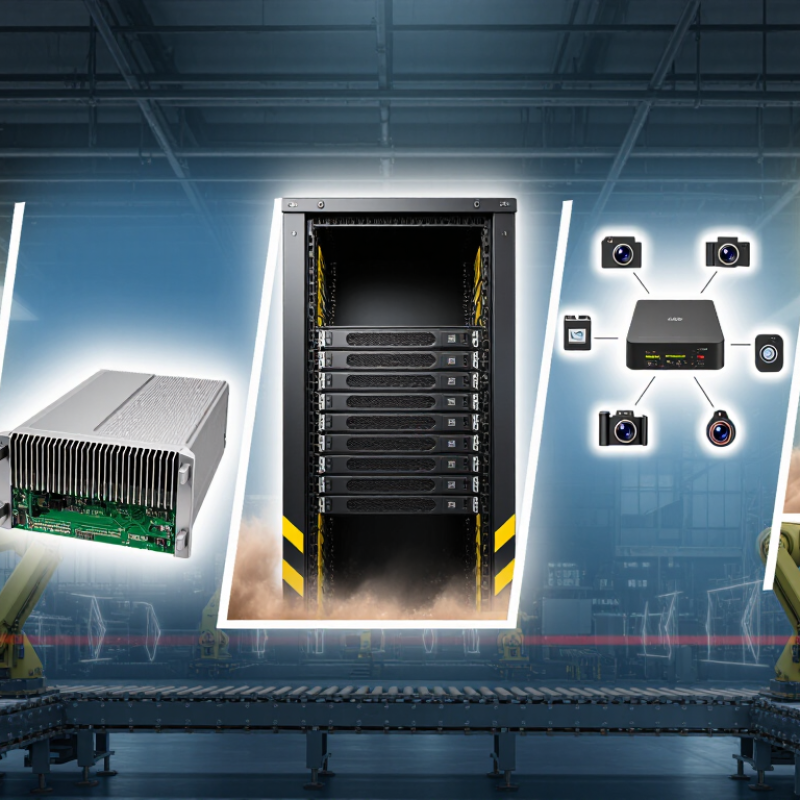
This guide examines rugged panel PCs, fanless embedded computers, industrial rack servers, edge devices, and programmable automation platforms. Each type solves a different operational problem. Fanless designs reduce dust entry, while rack systems offer stronger expansion and centralized management. Panel PCs provide clear operator control at the machine. Edge computers process camera and sensor data locally, reducing delays when network connections become unstable.

A reliable industrial computer system should be judged through practical evidence. Engineers should check operating temperature, ingress protection, shock resistance, mounting options, storage endurance, and long-term component availability. Certifications and documented test results also deserve careful review. Marketing language can sound impressive. It is not always proof.

Real installations reveal details that product sheets often miss. Can technicians replace storage without removing the entire unit? Are cables protected from oil and accidental impact? Does the display remain readable under harsh lighting? These questions influence uptime more than a slightly faster processor. However, no single system is best for every plant. Budget limits, software compatibility, maintenance skills, and future expansion can change the decision. Some recommendations may need revision after field testing. That is a weakness worth admitting, not hiding.
What Are the Top Industrial Computer Systems?

Defining Industrial Computer Systems and Their Core Functions

Industrial computer systems are purpose-built platforms that connect machines, operators, and production data. They include rugged computers, programmable controllers, operator panels, industrial servers, and edge gateways. Their design favors continuous operation, wider temperature tolerance, vibration resistance, and predictable response times.

A controller reads signals from sensors and adjusts motors, valves, or heaters. An industrial computer processes recipes, images, logs, and production rules. An operator panel displays alarms, trends, and work instructions near the machine. Gateways translate data between field devices, factory networks, and higher-level software. The boundary is not always clean. That matters when selecting a system.

Core functions include sensing, control, visualization, communication, data retention, and protection. On a filling line, sensors may detect bottle position while a controller changes conveyor speed within milliseconds. The local computer can store batch records and show a red alarm beside a temperature graph.

NIST SP 800-82 Rev. 3 emphasizes separating industrial control networks, limiting access, and maintaining secure monitoring. Deloitte’s 2024 Smart Manufacturing and Operations Survey reported that 86% of surveyed manufacturing leaders viewed smart manufacturing as a major competitiveness driver over the next three years. That figure supports investment, but it does not prove every connected device creates value. A credible assessment still checks recovery time, maintenance skills, network resilience, and lifecycle support. Small details matter.

Key Types of Industrial Computers and Their Typical Applications

What Are the Top Industrial Computer Systems?

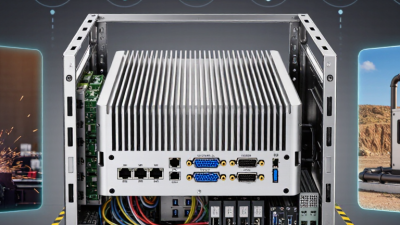
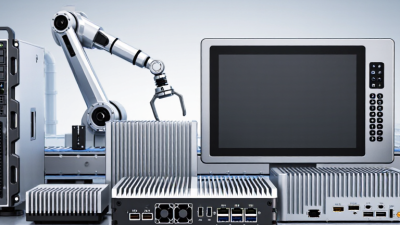
Industrial computers are selected by operating conditions, not office-style specifications. Panel PCs combine a display and computing unit for operator stations, where gloves, dust, and constant vibration are common. Rackmount systems fit control rooms and factory servers, supporting machine-vision archives, production databases, and supervisory control. Box PCs offer compact, fanless designs for robotic cells and inspection equipment.

Embedded and edge computers process sensor data near the machine. This reduces network delays during quality checks, conveyor tracking, and predictive maintenance. The International Federation of Robotics reported 541,302 industrial robots installed worldwide in 2023, a 10% increase from 2022. That growth increases demand for reliable local computing. However, robot growth does not automatically justify a powerful computer. Many tasks need careful configuration, not excessive processing capacity.

Mobile industrial computers support warehouse scanning, maintenance rounds, and outdoor utilities. Their practical value depends on battery life, screen readability, ingress protection, and wireless stability.

Grand View Research estimated the global industrial PC market at approximately 5.49 billion dollars in 2023, with continued growth expected through 2030. Market forecasts differ by scope and methodology.

The boundary between an industrial PC and an edge gateway is also becoming less clear. A dusty packaging line may need simple controls, while a vision station beside it may require GPU acceleration, redundant storage, and thermal monitoring. Performance alone is not enough.

Essential Hardware Features for Industrial Operating Environments

Industrial computer systems must survive conditions that ordinary office hardware cannot tolerate. In a factory, dust settles inside cabinets, motors create vibration, and temperatures may change sharply. A reliable system needs a wide operating temperature range, shock-resistant construction, and protection against dust and moisture.

Fanless cooling reduces moving parts and prevents clogged filters. However, fanless designs are not automatically better. Poor ventilation can still cause heat buildup near processors and power components. Engineers should check thermal test data, cabinet airflow, and continuous workload performance. That detail is often missed.

Power handling deserves equal attention. Industrial computers should support stable input ranges, surge protection, reverse-polarity protection, and isolated interfaces where electrical noise is present. A watchdog timer can restart a frozen application without requiring a technician to open the cabinet. Storage should tolerate vibration, while error-correcting memory can reduce failures caused by data corruption.

Ports also matter in real installations. Serial connections, industrial Ethernet, digital input and output, and expandable slots may be more valuable than advanced graphics. A system with unused performance but missing connectivity can create expensive redesign work. Long product availability is important because replacing hardware every year disrupts validated systems. I have seen installations fail for practical reasons, not dramatic ones: a loose connector, an undersized power supply, or heat trapped behind a panel. Field testing should include these uncomfortable details.

Comparing Performance, Reliability, Connectivity, and Expandability

What Are the Top Industrial Computer Systems?

Industrial computer performance is not measured by processor speed alone. In a factory, stable response matters more than a brief benchmark peak. MarketsandMarkets estimates that the industrial PC market could grow from about $5.9 billion in 2023 to $8.4 billion by 2028. That growth reflects rising edge-computing demand. A suitable system should process camera feeds, sensor data, and control tasks without thermal throttling. Field service experience shows a practical warning: an overloaded computer often fails quietly before it fails completely.

Reliability depends on temperature control, vibration resistance, dust protection, and predictable maintenance. Systems rated for wide operating temperatures can perform better near furnaces, compressors, or unconditioned cabinets. The 2024 World Robotics report recorded more than 540,000 industrial robot installations worldwide in 2023. More automation increases the cost of unexpected downtime. Still, higher specifications do not guarantee reliability. Poor airflow and loose cabling remain common weaknesses.

Connectivity shapes long-term value. A 2024 industrial network market study reported Ethernet-based networks carrying roughly two-thirds of new industrial connections. Therefore, computers should support multiple Ethernet ports, serial interfaces, fieldbus options, and time-sensitive networking where required. Expandability also deserves careful inspection. Check spare PCIe slots, memory capacity, storage bays, and remote-management support. More ports are not always better. An unused interface can increase configuration effort and maintenance risk. My own preference is conservative: choose available headroom, but avoid paying for expansion that the process will never use.

What Are the Top Industrial Computer Systems?

Comparing performance, reliability, connectivity, and expandability across common industrial computer architectures.

The chart uses a representative 0–10 capability index based on typical industrial configurations. Performance reflects processor and graphics capacity; reliability considers fanless cooling, ruggedization, and operating-temperature tolerance; connectivity includes industrial Ethernet, serial, USB, fieldbus, and wireless interfaces; expandability reflects available PCIe slots, drive bays, memory capacity, and modular options. Actual specifications vary by configuration.

How to Select the Right Industrial Computer System for Your Needs

Top industrial computer systems are not defined by processor speed alone. Choose panel PCs, box PCs, rack systems, or compact edge nodes according to the task. A dusty packaging line needs sealed cooling and vibration tolerance, not a fashionable specification. Start with I/O, temperature, ingress protection, storage, service access, and lifecycle availability. Measure the cabinet. Measure the risk.

Gartner forecast that 75% of enterprise-generated data would be created and processed outside traditional data centers by 2025 (Gartner, 2018). That prediction makes local computing valuable for fast alarms, machine vision, and disconnected operation. Still, edge does not mean ignoring the network. Use NIST SP 800-82 Rev. 3 to review segmentation, authentication, patching, and recovery for operational technology. A 2024 MarketsandMarkets report estimates industrial computer market growth near 6% annually through 2029.

In field evaluations, I compare a proposed system against the worst shift, not the showroom demo. Check boot time after power loss, fan replacement, cable strain, and readable diagnostics. Select industrial temperature ratings only when measurements justify them. Over-specifying hardware wastes budget. Under-specifying storage creates quiet failures. One weakness remains: lifecycle claims can be difficult to verify. Request written availability periods, tested operating ranges, and spare-unit procedures before approval. That evidence is more useful than a glossy benchmark.

What Are the Top Industrial Computer Systems? - How to Select the Right Industrial Computer System for Your Needs
Industrial Computer System Typical Form Factor Operating Temperature Range Typical Power Consumption Expansion and Connectivity Environmental Protection Key Advantages Best-Fit Applications Important Selection Considerations
Fanless Embedded Computer Compact box; DIN-rail or wall mounting Approximately −20°C to 60°C; extended-temperature models may support wider ranges Approximately 10–40 W, depending on processor and storage Gigabit Ethernet, USB, serial ports, digital I/O; optional wireless connectivity Typically fanless and vibration-resistant; enclosure ratings commonly range from IP30 to IP65 depending on the design Low maintenance, silent operation, reduced dust ingress, and compact installation Machine control, data acquisition, edge gateways, building automation, and transportation systems Verify thermal performance, mounting method, required I/O count, storage type, and long-term component availability
Industrial Box PC Small or medium-sized rugged enclosure Approximately −20°C to 70°C; some configurations support broader ranges Approximately 20–100 W Multiple Ethernet ports, USB, serial interfaces, display outputs, digital I/O, and optional fieldbus modules Fanless or filtered-air cooling; often designed for shock, vibration, and continuous operation Flexible deployment, strong connectivity, and a good balance between processing power and size Industrial IoT, machine vision gateways, robotics, inspection systems, and production monitoring Compare processor performance, GPU capability, available expansion modules, thermal design, and remote-management features
Industrial Panel PC Integrated display and computer; panel or arm mounting Approximately 0°C to 50°C for standard models; rugged models may support wider ranges Approximately 25–120 W, excluding external peripherals Touchscreen, Ethernet, USB, serial ports, display interfaces, and optional programmable-function support Front panels commonly offer IP65 protection; sealed designs help resist dust, water, and cleaning chemicals Combines visualization, operator control, and computing in one enclosure Human-machine interfaces, process control, packaging lines, warehouse systems, and factory dashboards Check screen size, brightness, touch technology, glove compatibility, front-panel sealing, and cleaning requirements
Rackmount Industrial Computer 19-inch rack chassis, commonly 1U to 4U high Approximately 0°C to 50°C in typical installations; wider ranges require specialized designs Approximately 150–800 W, depending on processors, storage, and expansion cards PCIe expansion, multiple Ethernet ports, storage bays, USB, serial interfaces, and redundant power options Metal chassis, replaceable filters, monitored fans, and optional redundant cooling or power supplies High processing capacity, extensive expansion, serviceability, and centralized installation Factory servers, supervisory control, video inspection, simulation, data logging, and industrial networking Assess rack depth, power availability, cooling airflow, noise, redundant components, storage redundancy, and maintenance access
Industrial Workstation Desktop or tower chassis for fixed installations Approximately 5°C to 35°C for common configurations; industrial variants may support wider ranges Approximately 200–1,000 W High-performance CPU or GPU, multiple PCIe slots, large memory capacity, professional display outputs, and network interfaces Enhanced cooling, dust filtration, reinforced chassis, and options for vibration-resistant storage Suitable for demanding visualization, engineering, analytics, and image-processing workloads CAD, digital twins, machine vision, process simulation, control-room visualization, and engineering analysis Prioritize GPU performance, memory capacity, software compatibility, thermal headroom, storage redundancy, and serviceability
Rugged Mobile Industrial Computer Portable computer or vehicle-mounted terminal Approximately −20°C to 60°C; specialized units may support wider ranges Approximately 15–80 W during normal operation Wi-Fi, cellular, GNSS, Ethernet, USB, serial interfaces, barcode or RFID support, and hot-swappable batteries on selected models Often tested for drop, shock, vibration, dust, and water resistance; protection levels vary by model Supports field work, mobility, remote diagnostics, and data collection in demanding environments Fleet management, utilities, logistics, field service, rail, mining, and outdoor maintenance Check drop rating, ingress protection, battery runtime, sunlight readability, wireless coverage, mounting, and repair procedures
Industrial Edge AI Computer Compact box or rackmount system with accelerator hardware Approximately −20°C to 60°C; temperature depends strongly on accelerator load Approximately 30–300 W High-speed Ethernet, camera interfaces, USB, serial I/O, digital I/O, GPU or AI accelerator support Ruggedized enclosure, fanless or controlled-air cooling, and storage designed for continuous write workloads Enables low-latency analytics and local decision-making without sending all data to the cloud Defect detection, predictive maintenance, video analytics, autonomous equipment, and real-time monitoring Evaluate inference performance, camera bandwidth, software frameworks, thermal limits, cybersecurity, and lifecycle support
PLC-Compatible Industrial Computer DIN-rail or control-cabinet-mounted computer Approximately −20°C to 60°C; cabinet ventilation can affect the actual operating range Approximately 10–60 W Industrial Ethernet, serial communication, digital I/O, fieldbus interfaces, and protocol gateways Designed for control cabinets; commonly supports vibration resistance and improved immunity to electrical interference Integrates computing, communication, and control functions in space-constrained automation environments Process automation, energy management, remote I/O, water treatment, and equipment control Confirm protocol compatibility, real-time requirements, electrical isolation, watchdog functions, and cabinet heat dissipation
Specifications are typical industry ranges rather than universal limits. Always confirm the exact operating temperature, ingress protection, certifications, power requirements, and availability of replacement components for the selected configuration.