Choosing the right rack mount computers in 2026 requires more than comparing processor speed or chassis height. Global buyers now evaluate thermal design, power efficiency, remote management, storage density, and regional service support. A compact 1U system may suit virtualization clusters with limited floor space. A 2U platform often offers better airflow and expansion flexibility. Large 4U systems can support multiple GPUs, high-capacity storage, or demanding artificial intelligence workloads.
Technology leader Michael Dell once said, “The cloud is not a place, it’s a way of doing IT.” His observation remains relevant because modern infrastructure depends on flexible deployment, not location alone. Rack mount computers now operate in enterprise data centers, factory control rooms, telecommunications cabinets, and remote edge sites. Each environment changes the buying decision. Noise, dust, vibration, and unstable power may matter more than benchmark scores.
This guide examines the top types for international purchasers, including standard server models, GPU-accelerated systems, storage-focused platforms, rugged edge computers, and short-depth designs. It also considers processor architecture, memory capacity, RAID options, cooling layouts, operating compatibility, warranty coverage, and long-term maintenance. Some buyers may overvalue peak performance. Others may underestimate shipping dimensions or replacement lead times. No ranking is perfect. A powerful system can still fail commercially if local support is weak. Practical testing, supplier verification, and workload planning should shape the final choice. The best rack mount computers are not always the most expensive. They are the systems that remain dependable after installation, expansion, and several demanding years.
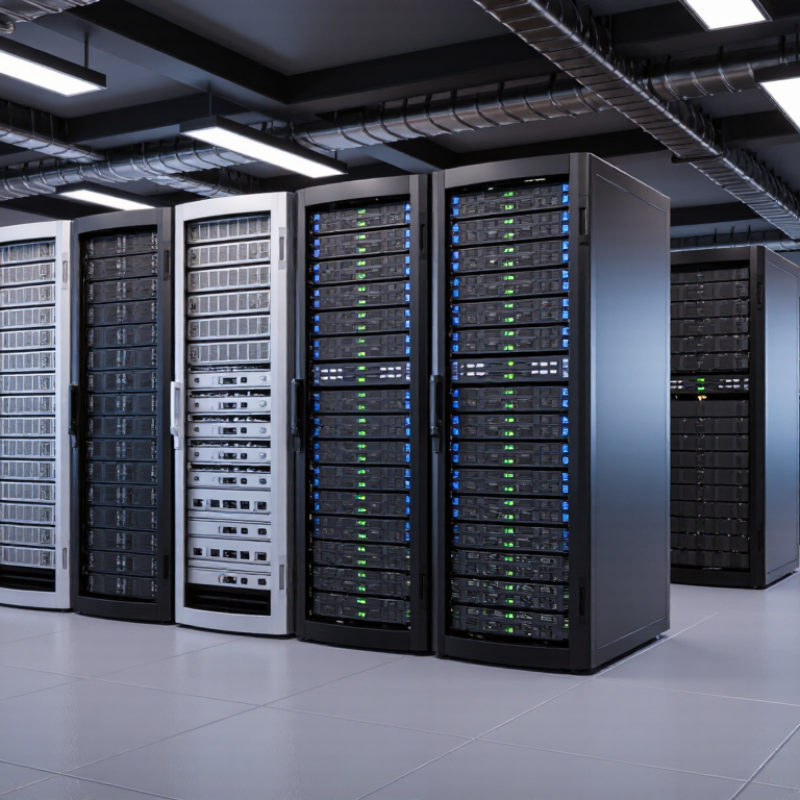
Rack mount computers are servers or industrial PCs built for installation inside standardized equipment cabinets. Their chassis is measured in rack units, or U. A 1U system is compact, while a 4U system provides more room for storage, cooling, and expansion. These computers work through processors, memory, storage, power supplies, and network interfaces. Technicians install them on rails and connect shared power and networking. Air moves from the cold aisle across internal components, then exits toward the hot aisle. This airflow path matters. The IEA’s Electricity 2024 report estimated global data center electricity use at about 460 TWh in 2022. Demand could nearly double by 2026.
Global buyers usually compare 1U, 2U, 4U, GPU-capable, storage-dense, and rugged rack systems. A 1U model suits web services and virtualization when density matters. A 2U model offers stronger cooling and more expansion space. Storage-heavy workloads often need 4U space and multiple drive bays. Rugged systems can support industrial sites with vibration, dust, or temperature variation. Uptime Institute’s Global Data Center Survey 2024 reported a median power usage effectiveness near 1.5 among respondents. That figure highlights cooling efficiency, but it does not fit every facility. The choice is rarely perfect. Future expansion is easy to underestimate.
Tips: Check rack depth, rail compatibility, voltage, noise, and service access before ordering. Request measured power draw, not only the maximum rating. Confirm remote management and spare-part availability in the destination country. Leave airflow clearance. A crowded rack can erase efficiency gains. Test failure recovery before deployment. Specifications look precise, but site conditions are not.
Rack mount computers are designed to fit standardized equipment racks. They slide into rack rails, receive power through rack power distribution units, connect to networks and peripherals, and use front-to-back airflow for cooling. The chart compares common rack heights using the international rack-unit standard, where 1U equals 44.45 mm.
How to read the chart: 1U systems maximize equipment density, 2U systems provide more room for storage and expansion, while 4U and 5U systems are commonly selected when buyers need larger cooling systems, additional drives, or accelerator hardware.
Rack mount computers are usually selected by rack unit, depth, workload, and service access. One rack unit, or 1U, equals 44.45 millimeters in height. The common cabinet width is 19 inches, following IEC 60297-1 and EIA-310 conventions. A 1U computer offers high density for web serving, virtualization, and edge deployment. It often sacrifices expansion space and cooling flexibility. A 2U system provides a better balance, with more drive bays, memory slots, and airflow room. A 4U system suits storage-heavy workloads, accelerator cards, and specialized computing. It needs more vertical space, but maintenance can be easier.
IDC’s Worldwide Quarterly Server Tracker evaluates server shipments by system type, including rack, tower, and blade configurations. Its market data supports rack systems as a central category for enterprise and data-center purchasing. Uptime Institute’s 2024 Global Data Center Survey also highlights continuing pressure around availability, energy efficiency, and operational skills. These factors make power draw and serviceability as important as processor speed. A short-depth 1U model may fit a remote cabinet, while a deep 2U model may block rear cable paths. Measure the rail length first. This is often missed.
Buyers should check loaded weight, inlet temperature, noise, redundant power, and tool-less access. ASHRAE TC 9.9 guidance commonly places recommended equipment inlet temperatures between 18°C and 27°C. That range is useful, but real rooms vary. A perfect sizing chart can still fail beside a crowded cable tray. Rack height, airflow, and future expansion deserve a physical drawing before purchase.
Rack mount computers serve different business needs, and their chassis height often reveals their intended workload. A 1U server suits web hosting, lightweight applications, and compact office clusters. It saves valuable rack space. However, its limited airflow and expansion room can restrict upgrades. A 2U system offers a practical balance for virtualization, file services, and database workloads. It usually provides more memory slots, storage bays, and cooling capacity.
Businesses handling analytics, engineering simulations, or machine learning may need a 4U rack mount computer. Its larger frame supports powerful processors, dedicated accelerators, and improved airflow. These systems need stronger power distribution and deeper server cabinets. Storage-focused operations may prefer a rack computer with many hot-swappable drive bays. This design helps manage video archives, research data, and continuous backups. Redundant power supplies and error-correcting memory improve reliability during long operating cycles.
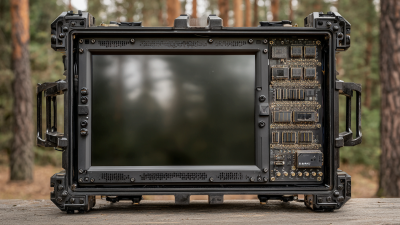
Retail stores and factories often need compact edge computers instead. They can process camera feeds, sensor readings, or inventory data near the worksite. Rugged construction matters where dust, vibration, or temperature changes are common. In real installations, compatibility problems are easy to underestimate. A chassis may fit the rack but block rear cables or exceed the available power budget. Measuring depth, checking rail support, and reviewing airflow plans prevents expensive rework. Remote management is also valuable when technicians cannot visit the equipment room quickly. Fancy specifications help less when maintenance access is poor.
For global buyers, rack mount computers should be compared by workload, not processor labels alone.
In testing and deployment planning, I start with sustained performance, core count, clock behavior, memory capacity, and ECC support. A system that wins a short benchmark may slow after an hour of analytics or virtualization. Check thermal throttling logs. Measure performance with actual applications. The fastest specification sheet is not always the fastest working system. That lesson is easy to miss.
Storage needs two comparisons: speed and usable resilience.
NVMe drives reduce queue delays, while SATA storage can offer economical capacity for archives. Review drive bays, hot-swap support, RAID options, and replacement access. A small cache is not a storage strategy. Cooling deserves equal attention. Count fan zones, inspect airflow direction, and confirm that the chassis suits the rack’s depth. In dusty rooms or warm cabinets, aggressive fans may protect components but increase noise and maintenance. I prefer recorded inlet and exhaust temperatures over optimistic figures. Still, one test room cannot represent every climate.
Expandability determines service life.
Count PCIe slots after installing graphics cards, network adapters, or storage controllers. Check power headroom, riser layout, memory slots, and firmware support. Leave physical space for cables. Otherwise, upgrades become expensive redesigns. Buyers should also verify voltage compatibility, rail kits, warranty response, and local service availability. These details affect reliability more than a polished specification table. Compare complete configurations, not bare chassis prices, and document every assumption before purchase.
Choosing the Right Rack Mount Computer for Global Deployment
Global deployment starts with operating conditions, not processor speed. A 1U rack mount computer suits dense server rooms and moderate workloads. A 2U system offers stronger cooling and expansion space. GPU-capable models fit AI inference, video analytics, and engineering workloads, but they demand more power and airflow. Storage-dense systems work well for local archives and data-heavy applications.
Power efficiency deserves equal attention. The International Energy Agency estimates that data centers used about 460 terawatt-hours of electricity worldwide in 2022. Demand could exceed 1,000 terawatt-hours by 2026. A smaller power supply, efficient processor, and controllable fan profile can reduce operating pressure. However, efficiency claims need testing under the buyer’s real workload. Laboratory figures may look attractive.
Reliability also depends on location. The 2024 Uptime Institute Global Data Center Survey reported that 54% of respondents experienced an outage during the previous three years. For remote sites, choose systems with redundant power, hot-swappable storage, remote management, and wide-temperature support. Check voltage compatibility before shipping. Humidity and dust matter too. A rugged short-depth chassis may outperform a faster standard unit in a roadside cabinet. This is where specifications can mislead. The “best” rack computer may still fail if local technicians cannot replace its parts quickly. Testing one unit in the target region remains wiser than trusting a brochure.
| Rank | Rack Mount Computer Type | Typical Height | Processing Profile | Expansion and Storage | Typical Power Range | Recommended Operating Environment | Key Advantages | Main Trade-Offs | Global Deployment Considerations |
|---|---|---|---|---|---|---|---|---|---|
| 1 | 1U General-Purpose Rack Computer | 1 rack unit 44.45 mm |
Single- or dual-socket processors; suitable for virtualization, networking services, monitoring, and business applications. | Usually 2–8 front-access drive bays; limited full-height expansion space; commonly supports PCIe add-in cards. | Approximately 250–800 W, depending on processor, storage, and expansion cards. | Data centers, colocation facilities, and space-constrained server rooms. | High rack density, efficient use of floor space, and broad application compatibility. | Limited internal airflow volume, smaller storage capacity, and less room for large expansion cards. | Check rack depth, rail compatibility, inlet-temperature rating, and local power distribution standards. |
| 2 | 2U Expandable Rack Computer | 2 rack units 88.9 mm |
One or two multi-core processors; appropriate for virtualization clusters, databases, analytics, and industrial applications. | Commonly 8–24 drive bays; more PCIe slots; improved support for hardware accelerators and high-capacity memory. | Approximately 400–1,500 W, depending on configuration. | Enterprise data centers, private clouds, and demanding industrial computing systems. | Balanced combination of compute density, storage capacity, cooling, and expansion. | Higher purchase, shipping, and energy costs than 1U systems; requires more rack space. | Confirm rack load capacity, service clearance, circuit capacity, and the availability of replacement components. |
| 3 | 4U GPU and AI Rack Computer | 4 rack units 177.8 mm |
High-core-count processors with one or more dedicated accelerators for AI inference, visualization, simulation, or parallel workloads. | Multiple PCIe expansion slots; supports high-speed networking, large memory configurations, and several high-performance storage devices. | Approximately 1,200–4,000 W or more, depending on accelerator count and configuration. | AI inference, machine learning, scientific computing, video processing, and digital-twin workloads. | High performance, substantial memory bandwidth, and flexible accelerator support. | High power consumption, heat output, noise, acquisition cost, and shipping weight. | Validate power connectors, cooling capacity, floor loading, export requirements, and local electrical regulations. |
| 4 | Short-Depth Edge Rack Computer | 1U–2U 44.45–88.9 mm |
Efficient multi-core processing for local analytics, gateway services, video management, and operational technology workloads. | Usually 2–12 drive bays; compact PCIe expansion; may include serial, network, or digital I/O interfaces. | Approximately 150–600 W. | Factories, retail sites, transportation hubs, telecom shelters, and remote facilities. | Fits shallow cabinets, reduces network latency, and can operate close to sensors or production equipment. | Less internal expansion and storage capacity than full-depth systems; fewer configuration options. | Prioritize vibration tolerance, dust protection, wide-temperature operation, remote management, and field serviceability. |
| 5 | Industrial Modular Rack Computer | 2U–4U 88.9–177.8 mm |
Reliable processors designed for continuous control, machine vision, data acquisition, and industrial automation. | Modular storage and I/O; may support serial ports, isolated interfaces, digital I/O, and specialized PCIe cards. | Approximately 200–1,000 W. | Industrial control rooms, energy facilities, transportation systems, and manufacturing lines. | Longer product-life planning, rugged construction, flexible I/O, and easier system integration. | Typically costs more than commercial systems with similar processing performance. | Review operating-temperature range, shock and vibration specifications, certifications, lifecycle support, and spare-part logistics. |
| 6 | Storage-Dense Rack Computer | 2U–4U 88.9–177.8 mm |
Balanced processor and memory resources optimized for file services, backup repositories, media storage, and software-defined storage. | Typically 12–60 drive bays, depending on chassis size and drive format; supports hardware or software storage controllers. | Approximately 500–2,000 W. | Backup systems, content repositories, surveillance storage, and private cloud storage pools. | High storage capacity, easier drive replacement, and good cost per usable terabyte. | Drive density increases heat, vibration, acoustic output, and power requirements. | Consider drive availability, RAID or erasure-coding requirements, data residency, encryption, and cross-border service coverage. |
| 7 | Network Security and Appliance Rack Computer | 1U–2U 44.45–88.9 mm |
Optimized for routing, firewalling, secure access, packet inspection, network monitoring, and communications workloads. | Several high-speed network ports; modest internal storage; optional PCIe networking or security acceleration. | Approximately 100–500 W. | Network operations centers, branch offices, telecom environments, and secure gateways. | Compact design, predictable throughput, low storage requirements, and centralized management. | Performance depends heavily on traffic type, encryption workload, port speed, and software licensing. | Verify regional radio and telecommunications rules, supported voltage, secure boot features, and remote-access controls. |
| 8 | High-Availability Rack Computer Pair | 1U–2U per node 44.45–88.9 mm |
Two or more coordinated systems designed for failover, load balancing, redundant services, or continuous operation. | Redundant storage or shared-storage connectivity; dual power supplies and multiple network interfaces are common. | Approximately 500–1,600 W for a two-node configuration. | Critical applications, payment infrastructure, telecommunications, and essential operational systems. | Reduces single points of failure and supports maintenance with less service interruption. | Higher hardware, software, networking, and administration costs; requires careful cluster design. | Plan for synchronized configurations, independent power feeds, geographic redundancy, disaster recovery, and local support response times. |