Buying a rugged computer in 2026 requires more than checking a product’s impact rating. Global teams face dust, vibration, rain, heat, cold, and unreliable connectivity. A device that survives a warehouse may still fail inside a mining vehicle.
This guide examines the leading pc rugged types for international buyers. It covers fully rugged laptops, semi-rugged notebooks, industrial tablets, handheld computers, vehicle-mounted PCs, and panel PCs. Each type serves different working conditions, budgets, and maintenance needs. Real work is unforgiving.
The comparison focuses on practical evidence, including IP protection, drop resistance, sunlight-readable displays, glove operation, battery replacement, thermal performance, and port reliability. It also considers repair access, warranty support, regional certifications, software compatibility, and long-term availability. These details often matter more than a dramatic specification sheet.
A higher IP rating does not guarantee better field performance. Laboratory testing can miss poor hinges, weak charging ports, or difficult repairs. Our framework is useful, not perfect. Buyer priorities also vary between emergency services, logistics centers, construction sites, utilities, and defense-free industrial operations.
Readers will find clear guidance for matching rugged PC designs with real deployment risks. We also highlight trade-offs that suppliers may understate. A lighter tablet can improve mobility but reduce connector protection. A powerful vehicle PC may need stronger cooling and specialized mounting. Careful selection begins with the worksite, not the brochure.
What Defines a Rugged PC in 2026?
A rugged PC is more than a thick metal case. It must survive dust, vibration, moisture, temperature changes, and repeated handling. IEC 60529 classifies IP65 as dust-tight and protected against water jets. IP67 adds temporary immersion protection. These ratings describe specific tests, not unlimited field immunity. That distinction matters.
The 2026 design standard also includes shock-mounted storage, sealed connectors, sunlight-readable displays, and glove-friendly controls. MIL-STD-810H testing can assess vibration, drops, humidity, altitude, and thermal stress. However, the standard is not a single pass-or-fail label. Test methods and severity levels must be checked carefully. A device tested for one transport scenario may fail beside a vibrating machine.
Market pressure is increasing. MarketsandMarkets’ Industrial PC Market report projects growth from about 5.8 billion dollars in 2023 to 8.2 billion dollars by 2028. The World Economic Forum’s Future of Jobs Report 2025 states that 39% of workers’ core skills may change by 2030. Rugged computers therefore need simpler interfaces and easier maintenance. Field technicians cannot waste time navigating fragile menus with wet gloves. They also need replaceable batteries, accessible ports, and long software support.
The weak point is often the connector.
A sealed enclosure still fails when cables bend sharply or ports loosen. Buyers should review test conditions, repair procedures, battery cycles, and support commitments. “Rugged” remains useful, but it is not precise enough alone.
Rugged PCs serve different working conditions, so global buyers should choose by risk rather than appearance. Fully rugged laptops and tablets suit construction sites, ports, utilities, and emergency fieldwork. They usually offer sealed enclosures, reinforced corners, sunlight-readable screens, and resistance to dust, water, vibration, and drops. A gloved worker can operate them beside a vehicle or generator.
Semi-rugged PCs fit warehouses, transport offices, clinics, and indoor industrial areas. They provide better protection than commercial computers without the weight of fully rugged equipment.
Portable rugged tablets are useful for inspections, delivery records, and asset tracking. Handheld rugged computers work well when workers need barcode scanning, GPS, or one-handed control. Vehicle-mounted PCs support fleet monitoring and dispatch tasks, especially where constant vibration and temperature changes are expected.
No type is perfect. I have seen buyers focus on drop ratings while overlooking screen visibility, battery replacement, or local service support. That mistake becomes expensive across multiple countries. Check documented test methods, IP protection ratings, operating temperature ranges, repair procedures, and warranty terms. Also confirm keyboard layouts, cellular bands, charging standards, language support, and available spare parts. A powerful processor may be unnecessary for simple forms, while data-heavy mapping needs stronger graphics and storage. Test the computer with real gloves, cables, sunlight, and dust before placing a large order. Small details often decide field reliability.
2026 Top Rugged PC Types for Global Buyers
How Rugged PCs Differ by Protection and Performance
Rugged PCs are not one uniform category. Field teams usually choose between semi-rugged, fully rugged, and ultra-rugged systems. Semi-rugged models suit warehouses, service vehicles, and indoor production areas. They often provide reinforced frames, spill resistance, and brighter displays. Fully rugged computers add sealed ports, shock protection, and wider operating-temperature ranges. Ultra-rugged systems are built for severe vibration, dust, moisture, and frequent transport.
Protection ratings need careful reading. An IP65 enclosure may resist dust and water jets, but it does not guarantee impact resistance. Drop testing, vibration testing, and connector strength matter too. In my experience, loose cables cause more field failures than cracked housings. Small details matter. A locking power plug can prevent an expensive shutdown.
Performance creates another dividing line. Basic industrial terminals may use energy-efficient processors and limited memory. They work well for inventory software, machine dashboards, and remote monitoring. More powerful rugged PCs support computer vision, data analysis, and multiple displays. However, stronger processors can produce more heat. That may reduce reliability inside a sealed enclosure. Buyers should check sustained performance, not only benchmark scores. Fanless designs are quieter, but they may throttle under heavy workloads. That trade-off is easy to miss.
I would also examine sunlight readability, glove operation, repair access, and replacement cycles. A computer that survives a drop but frustrates operators is not truly dependable. No specification sheet tells the whole story. Real testing in the target workplace remains necessary.
| Rugged PC Type | Typical Form Factor | Protection Level | Typical IP Range | Impact and Vibration Resistance | Typical Performance Class | Typical Memory and Storage | Typical Operating Temperature | Best-Fit Applications | Main Trade-Off |
|---|---|---|---|---|---|---|---|---|---|
| Semi-Rugged Notebook | Clamshell laptop with reinforced chassis, spill-resistant keyboard, and protected ports | Moderate to High | Usually IP54 to IP65 | Designed for transportation, field handling, and moderate vibration; selected models may be tested against MIL-STD-810H methods | Upper mainstream mobile computing; suitable for office software, diagnostics, GIS, documentation, and light engineering workloads | Typically 8–32 GB RAM; 256 GB–2 TB SSD | Commonly about -20°C to 60°C, depending on configuration | Utilities, public safety, field service, logistics, construction, and mobile inspections | Generally lighter and less expensive than fully rugged systems, but less protected against severe dust, water, drops, and extreme temperatures |
| Fully Rugged Notebook | Reinforced notebook with sealed enclosure, shock-absorbing corners, sunlight-readable display, and covered connectors | Very High | Commonly IP65 to IP68 | Built for repeated drops, strong vibration, dust, rain, and demanding transport conditions; testing depends on the product design | High mobile performance for CAD viewing, advanced diagnostics, mapping, virtualization, and data collection | Typically 16–64 GB RAM; 512 GB–2 TB SSD | Often about -29°C to 63°C, with exact limits varying by battery, display, and storage options | Defense support, emergency response, railways, mining, oil and gas, and harsh industrial maintenance | Higher purchase weight, size, and cost; maximum performance may be limited by sealed thermal design |
| Rugged Tablet | Portable touchscreen tablet with sealed housing, glove-capable interface, and optional keyboard or docking accessories | High | Typically IP65 to IP68 | Designed for drops, vibration, dust, and water exposure; drop height and test conditions differ by model | Efficient mobile performance for workflow applications, barcode scanning, electronic forms, navigation, and remote support | Typically 4–32 GB RAM; 64 GB–1 TB solid-state storage | Commonly about -20°C to 60°C | Warehouse operations, delivery, healthcare, field inspections, transportation, and asset management | Usually lower sustained processing performance and fewer integrated ports than rugged notebooks or box PCs |
| Vehicle-Mounted Computer | Fixed computer or display terminal with mounting hardware, external power input, and optional docking system | High | Usually IP54 to IP66 for the computer enclosure | Designed for continuous vibration, shock, electrical transients, and operation in moving vehicles | Moderate to high embedded performance for fleet control, warehouse execution, dispatch, telematics, and machine interfaces | Typically 8–32 GB RAM; 128 GB–2 TB SSD | Often about -30°C to 60°C, subject to mounting position and vehicle power conditions | Forklifts, trucks, public transit, mobile command vehicles, ports, and industrial fleets | Less portable; installation, power conditioning, antenna placement, and vehicle compatibility require additional planning |
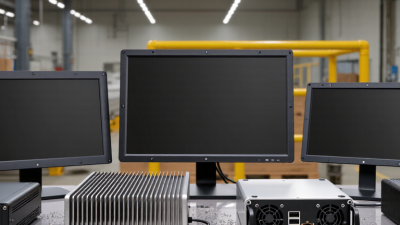
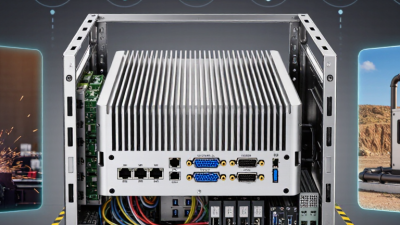
| Fanless Rugged Box PC | Compact sealed computer designed for panel, wall, DIN-rail, or vehicle installation | High | Commonly IP40 to IP67, depending on enclosure and installation | Solid-state construction and fanless cooling reduce maintenance points and improve resistance to dust and vibration | Moderate to high sustained embedded performance for edge analytics, industrial control, machine vision, and protocol conversion | Typically 8–64 GB RAM; 128 GB–4 TB SSD or industrial storage | Commonly about -20°C to 70°C; extended-temperature options may be available | Factories, energy systems, transportation infrastructure, surveillance, retail edge computing, and remote monitoring | Requires a separate display, keyboard, and mounting solution; passive cooling can constrain peak processor performance |
| Rugged Panel PC | Integrated industrial touchscreen computer with front-panel sealing and mounting bezel | Moderate to High | Front panel often IP65 or higher; rear enclosure rating varies | Designed for vibration, continuous operation, and frequent operator interaction in fixed installations | Moderate to high performance for human-machine interfaces, visualization, production monitoring, and control dashboards | Typically 8–32 GB RAM; 128 GB–2 TB SSD | Often about 0°C to 50°C for standard configurations; wider ranges require industrial options | Process control, food and beverage production, packaging, pharmaceuticals, and building automation | Screen size, mounting cutout, and thermal requirements make upgrades or relocation less flexible |
| Modular Rugged Workstation | High-performance rack, desktop, or transportable system using reinforced chassis and industrial components | Moderate to High | Often IP54 or higher when installed in a suitable enclosure | Can be configured for vibration and shock protection; environmental performance depends heavily on the chassis and deployment enclosure | Highest performance category for GPU computing, 3D visualization, simulation, video processing, and large data workloads | Typically 32–256 GB RAM; 1–16 TB SSD or other industrial storage | Commonly about 0°C to 50°C; specialized systems may support wider ranges | Command centers, defense engineering, industrial simulation, geospatial analysis, and mobile production units | Larger, heavier, more power-hungry, and usually less resistant to water and drops than fully rugged mobile computers |
Note: The specifications above are representative market ranges for product planning and comparison. Actual protection ratings, test methods, operating temperatures, performance, and configuration limits must be confirmed in the technical documentation for each individual model.
Rugged laptops suit field engineers, construction supervisors, and emergency teams working in dust, rain, or unstable temperatures. Their larger screens support maintenance diagrams, inspection forms, and remote meetings. Rugged tablets are more practical for warehouses, delivery routes, and healthcare rounds. Workers can scan labels, update records, and carry them with one hand. This sounds simple, but glare and glove operation often affect productivity more than expected.
Vehicle-mounted rugged computers are common in public transport, mining, ports, and utility fleets. They display navigation, dispatch information, and equipment status during long shifts. Panel PCs fit factories and control rooms, where operators need fixed screens near machinery. Handheld terminals work well for inventory checks and meter readings. Each type solves a different problem. Buying the strongest unit alone may create unnecessary cost.
Tips: Match the computer to its real environment, not only its advertised protection rating. Check screen brightness, port covers, battery replacement, mounting space, and glove compatibility. Ask local technicians about repairs and spare parts before ordering internationally. A device may survive a drop but still fail because its connector is poorly positioned. Test a small batch first. Field conditions are rarely as clean as the specification sheet.
2026 Top Rugged PC Types for Global Buyers
How to Select the Right Rugged PC for Your Market
Selecting a rugged PC starts with the work environment, not the product label. A warehouse terminal may need drop protection, glove-friendly controls, and bright displays. A vehicle-mounted computer needs stable power input, vibration resistance, and secure mounting. Outdoor teams may require sunlight readability, sealed connectors, and wide operating temperatures. Define these conditions before comparing processors or screen sizes.
I have seen buyers over-specify hardware while missing simple daily problems. A powerful computer is not useful if workers cannot read it at noon. Check the IP rating, impact standard, operating temperature, and service access. Confirm whether ports remain protected after repeated cable changes. Short trials are valuable. Test with real gloves, dust, rain covers, and vehicle movement.
Market requirements also shape the right choice. Review local electrical rules, wireless approvals, language support, and repair options before ordering. Ask about spare parts, firmware updates, warranty response, and expected service life. A removable battery can matter more than extra memory for mobile crews. Fanless designs reduce dust entry, but they may limit sustained performance. That trade-off deserves honest review. Choose practical durability over impressive specifications.
Ingress protection is a practical starting point when comparing rugged PC types. The chart uses representative procurement benchmarks based on the IEC 60529 IP-code structure: the first digit indicates dust protection and the second digit indicates water protection. Actual specifications vary by model and should be verified in the product datasheet.
Selection guide: Semi-rugged PCs suit controlled industrial and field environments. Fully rugged PCs are better for dust, rain, transport, and outdoor operations. Vehicle-mounted rugged PCs are commonly selected for logistics, public safety, mining, and heavy-equipment applications where water exposure and continuous vibration are concerns.