


2026 Top Types of Rugged Computer Systems for Global Buyers
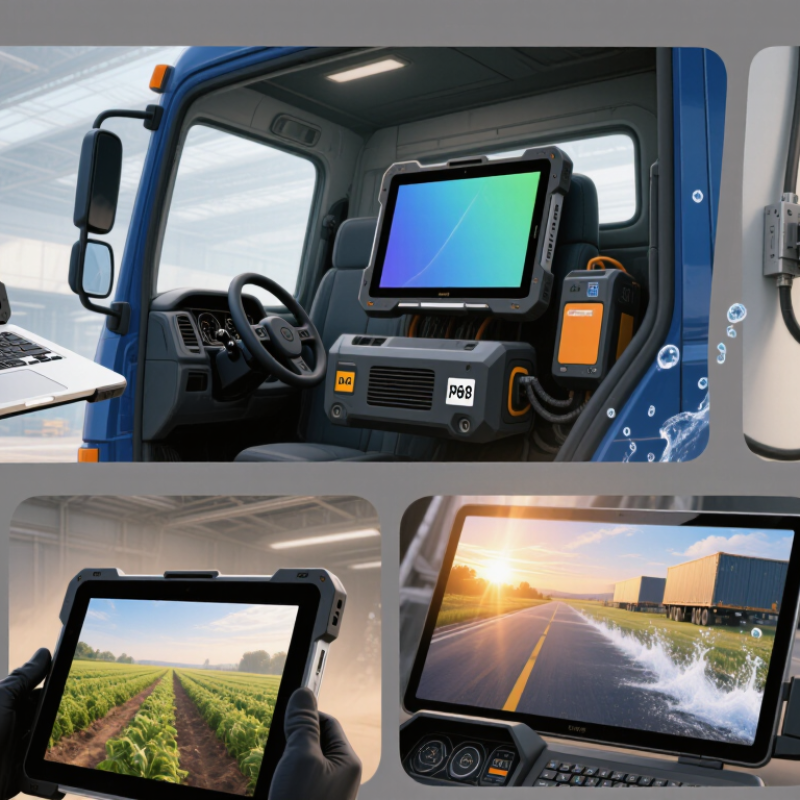
In 2026, rugged computer systems are no longer limited to military vehicles or remote oil fields. They now support logistics hubs, public transport, healthcare, manufacturing, agriculture, and critical infrastructure. A warehouse tablet may face concrete dust, glove operation, and twelve-hour shifts. A vehicle-mounted computer may endure vibration, heat, rain, and unstable power.
Global buyers need more than a reinforced case. They must compare rugged laptops, tablets, panel PCs, embedded computers, vehicle terminals, and portable workstations. Each type solves a different operational problem. IP ratings indicate resistance to dust and water. Drop testing, temperature ranges, sunlight readability, battery design, and service support also matter. Certification requirements can vary by country and industry, so local verification remains essential.
This guide examines the leading types of rugged computer systems expected to shape purchasing decisions in 2026. It considers performance, durability, connectivity, lifecycle cost, and practical deployment conditions. Manufacturer claims should be checked against test methods and real operating environments. A device advertised for extreme conditions may still fail when ports, batteries, or mounting hardware are overlooked. That is the uncomfortable part.
Reliable selection often begins with a simple question: Where will the computer work? Buyers should document vibration levels, cleaning routines, network coverage, screen visibility, and repair access before comparing models. No single system fits every market. The best choice balances proven protection with manageable cost, available support, and future software requirements. Expect trade-offs.ಿವೃದ್ಧ
Rugged Computer Systems: Definition and Core Characteristics
A rugged computer system is a computing device designed for demanding environments. It protects internal components from shock, vibration, dust, moisture, and temperature changes. Unlike ordinary office computers, it supports stable operation in vehicles, factories, warehouses, and outdoor work areas. Its value comes from dependable performance when repairs are difficult or delayed. Field inspections often reveal small weaknesses, such as loose ports or poorly sealed covers. These details matter.
Core characteristics include reinforced enclosures, sealed connectors, readable displays, and reliable mounting systems. Many models use screens that remain visible under direct sunlight or while operators wear gloves. Solid-state storage can reduce damage from movement and vibration. Wide-range power input is also useful in vehicles and remote installations. Thermal management deserves close attention, because strong protection can sometimes restrict airflow. No enclosure is indestructible.
A professional evaluation should examine impact ratings, ingress protection, operating temperature, display brightness, and service access. Buyers should request test evidence rather than trusting labels alone. Standards may be interpreted differently across regions, so documentation must be checked carefully. Long product availability can reduce replacement risks for global projects. However, a rugged computer is not automatically the best choice. Excessive protection may increase weight, cost, and installation time. I have seen purchasing teams focus on durability while overlooking keyboard comfort and cable routing. That mistake can reduce daily productivity, even when the hardware survives harsh conditions.
| Rugged Computer Type | Definition and Typical Form Factor | Core Protection Characteristics | Typical Processing and Expansion | Common Display or I/O Options | Best-Fit Industrial Applications | Key Buying Considerations |
|---|---|---|---|---|---|---|
| Rugged Panel PC | All-in-one computer with an integrated display, touchscreen, and computing unit. Usually mounted on a machine, control cabinet, wall, or operator console. | IP65 front Dust resistant Vibration resistant Fanless options | Commonly uses low-power x86 or ARM processors, solid-state storage, industrial Ethernet, serial ports, USB, and optional fieldbus interfaces. | Projected-capacitive or resistive touchscreen; commonly available in approximately 7–24 inch display sizes; sunlight-readable options are available. | Factory automation, process control, packaging lines, warehouse stations, food processing, and energy facilities. | Check cutout dimensions, front-panel sealing, touchscreen glove operation, mounting method, display brightness, and long-term availability. |
| Rugged Box PC | Compact stand-alone computer enclosed in a sealed or semi-sealed chassis without an integrated monitor. Designed for machine or vehicle integration. | IP40–IP67 options Fanless designs Shock resistant Wide-temperature options | Typically supports Intel or ARM embedded processors, M.2 or SATA solid-state storage, multiple LAN ports, USB, serial communication, GPIO, and wireless modules. | Connects to external displays, cameras, sensors, PLCs, barcode readers, and industrial networks. | Machine vision, edge computing, digital signage, transportation systems, remote monitoring, and automated inspection. | Evaluate thermal design, power input range, expansion slots, DIN-rail or VESA mounting, cable sealing, and remote-management capability. |
| Rugged Rackmount Computer | Computer installed in a standard equipment rack, generally using a 19-inch rack format for centralized processing and network or sensor integration. | Reinforced chassis Shock and vibration resistance EMI shielding Redundant power options | Supports higher-performance processors, multiple storage devices, PCIe expansion cards, RAID configurations, high-speed networking, and professional data acquisition hardware. | Front-panel status indicators, removable storage bays, serial interfaces, network ports, and expansion access through rear panels. | Defense systems, railway control, telecommunications, industrial data acquisition, command centers, and laboratory infrastructure. | Confirm rack height, depth, power redundancy, cooling airflow, acoustic limits, service access, RAID requirements, and compliance documentation. |
| Rugged Tablet | Portable touchscreen computer designed for mobile operation in industrial, field-service, logistics, public-safety, and outdoor environments. | IP65–IP68 options Drop tested MIL-STD-810H testing Hot-swappable battery options | Usually uses mobile x86 or ARM processors, solid-state storage, Wi-Fi, Bluetooth, cellular connectivity, GNSS, NFC, and optional barcode or RFID readers. | Approximately 8–14 inch sunlight-readable displays; glove and wet-touch operation may be supported. | Field maintenance, utilities, construction, transportation, warehousing, healthcare logistics, and emergency response. | Compare weight, battery runtime, charging accessories, screen readability, cellular bands, drop height, accessory ecosystem, and repairability. |
| Vehicle-Mount Computer | Computer fixed to a forklift, truck, train, heavy vehicle, or specialized mobile platform for continuous operation during movement. | Vibration resistant Wide DC input Ignition control IP65 options | Uses low-power processors, solid-state storage, Wi-Fi, cellular, GNSS, CAN bus, serial ports, USB, and vehicle power-management circuitry. | Commonly includes 7–15 inch touchscreens, physical function keys, remote antennas, barcode scanners, and forklift mounting brackets. | Warehouse vehicles, fleet management, public transit, rail maintenance, mining vehicles, ports, and field logistics. | Verify input-voltage range, transient protection, ignition behavior, mounting strength, antenna placement, screen visibility, and operator safety. |
| Rugged Handheld Computer | Small mobile computer designed for one-handed or belt-mounted use, often integrating a barcode scanner, camera, RFID reader, or push-to-talk function. | IP65–IP68 options Drop resistant Glove operation Sealed connectors | Generally uses mobile processors, flash storage, Wi-Fi, Bluetooth, cellular connectivity, GNSS, and integrated data-capture modules. | Typically has a 4–7 inch touchscreen, programmable keys, scan triggers, high-visibility display, and optional physical keyboard. | Inventory management, parcel delivery, retail operations, asset tracking, utilities, public safety, and healthcare rounds. | Consider scan speed, ergonomics, battery replacement, network roaming, accessory compatibility, sanitation requirements, and lifecycle support. |
| Rugged Embedded Computer | Board-level or compact computer integrated into a larger machine, instrument, robot, gateway, or autonomous system. | Conformal-coating options Wide-temperature options Low power Vibration resistant | Available with ARM, x86, or other embedded architectures; may provide GPIO, serial buses, CAN, PCIe, M.2, camera interfaces, and hardware acceleration. | Usually has no integrated display; connects to a host display, machine interface, camera system, or remote management platform. | Robotics, medical instruments, autonomous vehicles, industrial gateways, smart infrastructure, surveillance, and aerospace equipment. | Assess board dimensions, operating system support, boot security, thermal envelope, connector retention, software longevity, and certification needs. |
| Rugged Convertible Laptop | Portable computer combining laptop and tablet modes, with a reinforced hinge, integrated keyboard, and display designed for field productivity. | IP-rated options Drop tested Shock resistant Backlit keyboard options | Often provides mobile x86 processors, solid-state storage, USB, Ethernet through adapters or docks, wireless connectivity, and removable or extended batteries. | Approximately 11–15 inch touchscreen displays; may support stylus input, daylight-readable panels, and docking stations. | Engineering inspection, infrastructure maintenance, military logistics, surveying, field service, and technical documentation. | Balance performance against weight, keyboard sealing, hinge durability, battery runtime, port availability, display readability, and transportability. |
Note: Protection ratings, temperature ranges, drop performance, and environmental test results vary by configuration. Buyers should verify the exact model documentation, applicable IEC 60529 IP rating, and any claimed MIL-STD-810H test methods before purchase.
Related Posts
-
Why Rugged Industrial Computers Are Essential for Manufacturing Success?
-
2026 Best Rugged Military Computers for Global Buyers?
-
What is a Ruggedized PC and Why Do You Need One?
-

Innovative Applications of Rugged PCs in Extreme Environments
-

Essential Techniques for Maximizing Industrial Panel Performance in Your Operations
-
Top 5 Rugged Military Computers for Extreme Conditions You Need to Consider